
- ASIC
- Battery management ICs
- Clocks and timing solutions
- ESD and surge protection devices
- Automotive Ethernet
- Evaluation Boards
- High reliability
- Isolation
- Memories
- Microcontroller
- Power
- RF
- Security and smart card solutions
- Sensor technology
- Small signal transistors and diodes
- Transceivers
- Universal Serial Bus (USB)
- Wireless connectivity
- Search Tools
- Technology
- Packages
- Product Information
- Ordering
- Overview
- Automotive Ethernet PHY for in-vehicle networking
- Automotive Ethernet Switches for in-vehicle networking
- Overview
- Embedded flash IP solutions
- Flash+RAM MCP solutions
- F-RAM (Ferroelectric RAM)
- NOR flash
- nvSRAM (non-volatile SRAM)
- PSRAM – Pseudostatic RAM
- Radiation hardened and high-reliability memories
- SRAMs (Static Random Access Memory)
- Wafer and die memory solutions
- Overview
- AURIX™ TriCore™ MCUs
- PSOC™ MCUs
- TRAVEO™ T2G MCUs
- XMC™ MCUs
- Legacy MCUs
- MOTIX™ motor control SoCs/SIPs
- Overview
- AC-DC power conversion
- Automotive conventional powertrain ICs
- Class D audio amplifier ICs
- Contactless power and sensing ICs
- DC-DC converters
- Diodes and thyristors (Si/SiC)
- eFuses
- Gallium nitride (GaN)
- Gate Driver ICs
- IGBTs – Insulated gate bipolar transistors
- Intelligent power modules (IPM)
- JFETs
- LED driver ICs
- Motor drivers
- MOSFETs
- Power modules
- Power supply ICs
- Protection and monitoring ICs
- Silicon carbide (SiC)
- Smart power switches
- Solid state relays and isolators
- Wireless charging ICs
- Overview
- Antenna cross switches
- Antenna tuners
- Bias and control
- Coupler
- Driver amplifiers
- Rad hard microwave and RF
- Low noise amplifiers (LNAs)
- RF diode
- RF switches
- RF transistors
- Wireless control receiver
- Overview
- Calypso® products
- CIPURSE™ products
- Contactless memories
- OPTIGA™ embedded security solutions
- SECORA™ security solutions
- Security controllers
- Smart card modules
- Smart solutions for government ID
- Overview
- ToF 3D image sensors
- Current sensors
- Gas sensors
- Inductive position sensors
- MEMS microphones
- Pressure sensors
- Radar sensors
- Magnetic position sensors
- Magnetic speed sensors
- Capacitive sensors
- Temperature sensors
- Battery sensors
- Digital X-ray
- Computed tomography
- Sensor interface ASICs
- Overview
- Bipolar transistors
- Diodes
- Small signal/small power MOSFET
- Overview
- Automotive transceivers
- Control communication
- Powerline communications
- Overview
- USB 2.0 peripheral controllers
- USB 3.2 peripheral controllers
- USB hub controllers
- USB PD high-voltage microcontrollers
- USB-C AC-DC and DC-DC charging solutions
- USB-C charging port controllers
- USB-C Power Delivery controllers
- Overview
- AIROC™ Automotive wireless
- AIROC™ Bluetooth® and multiprotocol
- AIROC™ connected MCU
- AIROC™ Wi-Fi + Bluetooth® combos
- AIROC™ Ultra-Wide Band Solutions
- Overview
- Commercial off-the-shelf (COTs) memory portfolio
- Defense memory portfolio
- High-reliability power conversion and management
- Overview
- Rad hard microwave and RF
- Radiation hardened power
- Space memory portfolio
- Overview
- Parallel NOR flash
- SEMPER™ NOR flash family
- SEMPER™ X1 LPDDR flash
- Serial NOR flash
- Overview
-
32-bit TriCore™ AURIX™ – TC2x
- Overview
- AURIX™ family – TC21xL
- AURIX™ family – TC21xSC (wireless charging)
- AURIX™ family – TC22xL
- AURIX™ family – TC23xL
- AURIX™ family – TC23xLA (ADAS)
- AURIX™ family – TC23xLX
- AURIX™ family – TC264DA (ADAS)
- AURIX™ family – TC26xD
- AURIX™ family – TC27xT
- AURIX™ family – TC297TA (ADAS)
- AURIX™ family – TC29xT
- AURIX™ family – TC29xTT (ADAS)
- AURIX™ family – TC29xTX
- AURIX™ TC2x emulation devices
-
32-bit TriCore™ AURIX™ – TC3x
- Overview
- AURIX™ family - TC32xLP
- AURIX™ family – TC33xDA
- AURIX™ family - TC33xLP
- AURIX™ family – TC35xTA (ADAS)
- AURIX™ family – TC36xDP
- AURIX™ family – TC37xTP
- AURIX™ family – TC37xTX
- AURIX™ family – TC38xQP
- AURIX™ family – TC39xXA (ADAS)
- TC39xXX/XP
- AURIX™ family – TC3Ex
- AURIX™ TC37xTE (emulation devices)
- AURIX™ TC39xXE (emulation devices)
- 32-bit TriCore™ AURIX™ – TC4x
- Overview
- PSOC™ 4 Arm® Cortex®-M0/M0+
- PSOC™ 4 HV Arm® Cortex®-M0+
- PSOC™ 5 LP Arm® Cortex®-M3
- PSOC™ 6 Arm® Cortex®-M4/M0+
- PSOC™ Multitouch Touchscreen Controller
- PSOC™ Control C3 Arm® Cortex®-M33
- PSOC™ Automotive 4: Arm® Cortex®-M0/M0+
- PSOC™ Edge Arm® Cortex® M55/M33
- PSOC™ Control C1 Arm® Cortex®-M0
- Overview
- 32-bit TRAVEO™ T2G Arm® Cortex® for body
- 32-bit TRAVEO™ T2G Arm® Cortex® for cluster
- Overview
- 32-bit XMC1000 industrial microcontroller Arm® Cortex®-M0
- 32-bit XMC4000 industrial microcontroller Arm® Cortex®-M4
- XMC5000 Industrial Microcontroller Arm® Cortex®-M4F
- 32-bit XMC7000 Industrial Microcontroller Arm® Cortex®-M7
- Overview
- Legacy 32-bit MCU
- Legacy 8-bit/16-bit microcontroller
- Other legacy MCUs
- 32-bit FM Arm® Cortex® Microcontroller
- Sensing controllers
- Overview
- AC-DC integrated power stage - CoolSET™
- AC-DC PWM and PFC controller
- Overview
- Bridge rectifiers & AC switches
- CoolSiC™ Schottky diodes
- Diode bare dies
- Silicon diodes
- Thyristor / Diode Power Modules
- Thyristor soft starter modules
- Thyristor/diode discs
- Overview
- GaN bidirectional switches
- GaN smart
- GaN transistors (GaN HEMTs)
- GaN with integrated driver
- GaN bare dies
- Overview
- Automotive gate driver ICs
- Gate Driver ICs for GaN HEMTs
- Gate Driver ICs for SiC MOSFETs
- Half-Bridge Gate Driver ICs
- High-Side Gate Driver ICs
- Isolated Gate Driver ICs
- Level-Shift Gate Driver ICs
- Low-Side Gate Driver ICs
- Three-Phase Gate Driver ICs
- Transformer Driver ICs
- Overview
- AC-DC LED driver ICs
- Ballast IC
- DC-DC LED driver IC
- LED dimming interface IC
- Linear LED driver IC
- LITIX™ - Automotive LED Driver IC
- NFC wireless configuration IC with PWM output
- VCSEL driver
- Overview
- BLDC motor drivers
- BDC motor drivers
- Stepper & servo motor drivers
- Motor drivers with MCU
- Bridge drivers with MOSFETs
- Gate Driver ICs
- Overview
- Automotive MOSFET: 30 V to 800 V
- Dual MOSFETs
- MOSFET (Si & SiC) Modules
- N-channel depletion mode MOSFET
- N-channel MOSFETs
- P-channel MOSFETs
-
Silicon carbide CoolSiC™ MOSFETs
- Overview
- Silicon Carbide MOSFET modules
- Silicon carbide MOSFET discretes
- Silicon carbide MOSFETs bare dies
- 400 V / 440 V Silicon Carbide MOSFETs
- 650 V Silicon Carbide MOSFETs
- 750 V Silicon Carbide MOSFETs
- 1200 V Silicon Carbide MOSFETs
- 2000 V Silicon Carbide MOSFETs
- 2300 V Silicon Carbide MOSFETs
- 3300 V Silicon Carbide MOSFETs
- 1700 V Silicon Carbide MOSFETs
- Small signal/small power MOSFET
- Overview
- IGBT modules
- MOSFET (Si & SiC) Modules
- Intelligent power modules (IPM)
- Diodes and thyristors (Si/SiC)
- Automotive IGBT and CoolSiC™ MOSFET modules
- High density power modules
- Overview
- Automotive transceivers
- Linear voltage regulators
- Power management ICs (PMIC)
- Automotive switching regulators
- System Basis Chips (SBC)
- Overview
- High-side switches
- Low-side switches
- Multichannel SPI Switches & Controller
- Automotive eFuses
- Overview
- Radar sensors for automotive
- Radar sensors for IoT
- Overview
- EZ-USB™ CX3 MIPI CSI2 to USB 3.0 camera controller
- EZ-USB™ FX10 & FX5N USB 10Gbps peripheral controller
- EZ-USB™ FX20 USB 20 Gbps peripheral controller
- EZ-USB™ FX3 USB 5 Gbps peripheral controller
- EZ-USB™ FX3S USB 5 Gbps peripheral controller with storage interface
- EZ-USB™ FX5 USB 5 Gbps peripheral controller
- EZ-USB™ SD3 USB 5 Gbps storage controller
- EZ-USB™ SX3 FIFO to USB 5 Gbps peripheral controller
- Overview
- EZ-PD™ PMG1-B1 Battery Charge Controller with USB-C PD MCU
- EZ-PD™ PMG1-S0 high-voltage MCU with USB-C and PD
- EZ-PD™ PMG1-S1 high-voltage MCU with USB-C and PD
- EZ-PD™ PMG1-S2 high-voltage MCU with USB PD
- EZ-PD™ PMG1-S3 high-voltage MCU with USB-C & PD
- EZ-PD™ PMG1-B2 Battery Charge Controller with USB-C PD MCU
- Overview
- EZ-PD™ CCG3 USB type-C port controller PD
- EZ-PD™ CCG3PA USB-C and PD
- EZ-PD™ CCG3PA-NFET USB-C PD controller
- EZ-PD™ CCG7x consumer USB-C Power Delivery & DC-DC controller
- EZ-PD™ PAG1: power adapter generation 1
- EZ-PD™ PAG2: Power Adapter Generation 2
- EZ-PD™ PAG2-PD USB-C PD Controller
- Overview
- EZ-PD™ ACG1F one-port USB-C controller
- EZ-PD™ CCG2 USB Type-C port controller
- EZ-PD™ CCG3PA Automotive USB-C and Power Delivery controller
- EZ-PD™ CCG4 two-port USB-C and PD
- EZ-PD™ CCG5 dual-port and CCG5C single-port USB-C PD controllers
- EZ-PD™ CCG6 one-port USB-C & PD controller
- EZ-PD™ CCG6_CFP and EZ-PD™ CCG8_CFP Dual-Single-Port USB-C PD
- EZ-PD™ CCG6DF dual-port and CCG6SF single-port USB-C PD controllers
- EZ-PD™ CCG7D Automotive dual-port USB-C PD + DC-DC controller
- EZ-PD™ CCG7S Automotive single-port USB-C PD solution with a DC-DC controller + FETs
- EZ-PD™ CCG8 dual-single-port USB-C PD
- EZ-PD™ CMG1 USB-C EMCA controller
- EZ-PD™ CMG2 USB-C EMCA controller with EPR
Browse by core architecture
Browse by key technologies
Browse by design resources & partners
- LATEST IN
- Aerospace and defense
- Automotive
- Communications
- Consumer electronics
- Health and lifestyle
- Industrial
- AI and data center
- Security solutions
- Smart home and building
- Solutions
- Overview
- Defense applications
- Space applications
- Overview
- ADAS & autonomous driving
- Automotive body electronics
- Chassis control & safety
- Electric vehicle drivetrain system
- EV thermal management system
- In-vehicle infotainment & HMI
- Automotive LED lighting systems
- Light electric vehicle solutions
- Automotive zonal architecture
- Overview
- Satellite communications
- Telecommunications infrastructure
- Overview
- Power adapters and chargers
- Complete system solutions for smart TVs
- Mobile device and smartphone solutions
- Semiconductor solutions for home entertainment applications
- Smart conference systems
- Drones
- AR and smart glasses
- Photovoltaic
- Consumer Wearables
- Home appliances
- Overview
- Asset Tracking
- Battery formation and testing
- Power adapters and chargers
- Industrial robots
- Light electric vehicle solutions
- Uninterruptible power supplies (UPS)
- Digital health
- Electric forklifts
- Battery energy storage (BESS)
- EV charging
- High voltage solid-state power distribution
- Hydrogen electrolysis
- Industrial automation
- Industrial motor drives and controls
- Industrial & Medical SMPS
- LED lighting system design
- Photovoltaic
- Power tools
- Power transmission and distribution
- Robotics
- Traction
- Wind power
- Overview
- Machine Learning Edge AI
- Data center power solutions
- Edge computing
- Overview
- Device authentication and brand protection
- eSIM applications
- Government identification
- Mobile security
- Payment solutions
- Embedded security for the Internet of Things (IoT)
- Access control and ticketing
- Overview
- Domestic robots
- Semiconductor solutions for home entertainment applications
- Home and building automation
- Heating ventilation and air conditioning (HVAC)
- PC accessories
- Overview
- Battery management systems (BMS)
- Connectivity
- Human Machine Interface
- Machine Learning Edge AI
- Motor control
- Power conversion
- Security
- Sensor solutions
- System diagnostics and analytics
- Overview
- Active suspension control
- Automotive braking solutions
- Automotive steering solutions
- Chassis domain control
- Overview
-
Automotive battery management system
- Overview
- Automotive battery cell monitoring & balancing
- Automotive battery control unit (BCU)
- Automotive battery isolated communication
- Automotive battery passport & event logging
- Automotive battery pack monitoring
- BMS (electric two- & three-wheelers)
- Automotive battery protection & disconnection
- Automotive current sensing & coulomb counting
- Automotive battery management system (BMS) - high-voltage
- Automotive battery management system (BMS) - 12 V to 24 V
- Automotive battery management system (BMS) - 48 V
- Auxiliary inverter - high-voltage (commercial vehicles)
- Auxiliary inverter
- EV charging
- FCEV powertrain solutions
- DC-DC converter high-voltage
- DC-DC converter high-voltage (commercial vehicles)
- On-board charging (OBC)
- On-board charging (OBC) solutions for electric two- and three-wheelers
- On-board charging (electric commercial vehicles)
- EV traction inverter
- Traction inverter (electric commercial vehicles)
- Traction inverter (electric two- & three-wheelers)
- Overview
- Automotive animated LED lighting system
- Full LED headlight system - multi-channel LED driver
- Automotive LED rear single light functions
- LED driver solutions for electric two- and three-wheelers
- LED pixel light controller - supply & communication
- Automotive LED front single light functions
- Static interior ambient LED light
- Overview
- Audio amplifier solutions
- Complete system solutions for smart TVs
- Distribution audio amplifier unit solutions
- Home theater installation speaker system solutions
- Party speaker solutions
- PoE audio amplifier unit solutions
- Portable speaker solutions
- Powered active speaker systems
- Remote control
- Smart speaker designs
- Soundbar solutions
- Overview
- Disposable healthcare equipment
- Durable healthcare equipment
- Healthcare wearables
- Overview
- Data center power solutions
- Industrial robots
- Industrial motor drives and controls
- Mobile robots (AGV, AMR)
- Home and building automation
- Solid-state circuit breaker (SSCB)
- Uninterruptible power supplies (UPS)
- Digital input/output (I/O) modules
- DIN rail power supply solutions
- Industrial HMI Monitors and Panels
- Industrial PC
- Machine vision
- Programmable logic controller (PLC)
- Overview
- FPGAs in datacenter applications
- Power system reliability modeling
- Data center power distribution
-
Server rack power management
- Overview
- Intermediate Bus Converter (IBC)
- AI accelerator cards
- AMD CPU voltage regulator Ics
- Ampere CPU voltage regulator Ics
- Intel CPU voltage regulator Ics
- Network switches for AI data centers and server racks
- Server power path protection
- Server battery backup units (BBU)
- Server power supply units (PSU)
- SmartNIC cards
- Overview
- Automotive battery management system
- Industrial and consumer BMS
- Overview
- AC-DC power conversion
- DC-DC power conversion
- Overview
- Power supply health monitoring
- LATEST IN
- Digital documentation
- Boards & Kits
- Finder & selection tools
- Platforms
- Services
- Simulation & Modeling
- Software
- Tools
- Partners
- Infineon for Makers
- University Alliance Program
- Overview
- Bipolar Discs Finder
- Bipolar Module Finder
- Connected Secure Systems Finder
- Diode Rectifier Finder
- ESD Protection Finder
- Evaluation Board Finder
- Gate Driver Finder
- IGBT Discrete Finder
- IGBT Module Finder
- IPM Finder
- Microcontroller Finder
- MOSFET Finder
- PMIC Finder
- Product Finder
- PSOC™ and FMx MCU Board & Kit Finder
- Radar Finder
- Reference Design Finder
- Simulation Model Finder
- Smart Power Switch Finder
- Transceiver Finder
- Voltage Regulator Finder
- Wireless Connectivity Board & Kit Finder
- Overview
- AIROC™ software & tools
- AURIX™ software & tools
- DRIVECORE™ for automotive software development
- iMOTION™ software & tools
- Infineon Smart Power Switches & Gate Driver Tool Suite
- MOTIX™ software & tools
- OPTIGA™ software & tools
- PSOC™ software & tools
- TRAVEO™ software & tools
- XENSIV™ software & tools
- XMC™ software & tools
- Overview
- CoolGaN™ Simulation Tool (PLECS)
- HiRel Fit Rate Tool
- Infineon Designer
- Interactive product sheet
- IPOSIM Online Power Simulation Platform
- InfineonSpice Offline Simulation Tool
- OPTIREG™ automotive power supply ICs Simulation Tool (PLECS)
- Power MOSFET Simulation Models
- PowerEsim Switch Mode Power Supply Design Tool
- Solution Finder
- XENSIV™ Magnetic Sensor Simulation Tool
- Overview
- AURIX™ certifications
- AURIX™ development tools
-
AURIX™ Embedded Software
- Overview
- AURIX™ Applications software
- AURIX™ Artificial Intelligence
- AURIX™ Gateway
- AURIX™ iLLD Drivers
- Infineon safety
- AURIX™ Security
- AURIX™ TC3xx Motor Control Application Kit
- AURIX™ TC4x SW application architecture
- Infineon AUTOSAR
- Communication and Connectivity
- Middleware
- Non AUTOSAR OS/RTOS
- OTA
- AURIX™ Microcontroller Kits
- Overview
- TRAVEO™ Development Tools
- TRAVEO™ Embedded Software
- Overview
- XENSIV™ Development Tools
- XENSIV™ Embedded Software
- XENSIV™ evaluation boards
- Overview
- CAPSENSE™ Controllers Code Examples
- Memories for Embedded Systems Code Examples
- PSOC™ 1 Code Examples for PSOC™ Designer
- PSOC™ 3 Code Examples for PSOC™ Creator
- PSOC™ 3/4/5 Code Examples
- PSOC™ 4 Code Examples for PSOC™ Creator
- PSOC™ 6 Code Examples for PSOC™ Creator
- PSOC™ 63 Code Examples
- USB Controllers Code Examples
- Overview
- DEEPCRAFT™ AI Hub
- DEEPCRAFT™ Audio Enhancement
- DEEPCRAFT™ Model Converter
-
DEEPCRAFT™ Ready Models
- Overview
- DEEPCRAFT™ Ready Model for Baby Cry Detection
- DEEPCRAFT™ Ready Model for Cough Detection
- DEEPCRAFT™ Ready Model for Direction of Arrival (Sound)
- DEEPCRAFT™ Ready Model for Factory Alarm Detection
- DEEPCRAFT™ Ready Model for Fall Detection
- DEEPCRAFT™ Ready Model for Gesture Classification
- DEEPCRAFT™ Ready Model for Siren Detection
- DEEPCRAFT™ Ready Model for Snore Detection
- DEEPCRAFT™ Studio
- DEEPCRAFT™ Voice Assistant
- Overview
- AIROC™ Wi-Fi & Bluetooth EZ-Serial Module Firmware Platform
- AIROC™ Wi-Fi & Bluetooth Linux and Android Drivers
- emWin Graphics Library and GUI for PSOC™
- Infineon Complex Device Driver for Battery Management Systems
- Memory Solutions Hub
- PSOC™ 6 Peripheral Driver Library (PDL) for PSOC™ Creator
- USB Controllers EZ-USB™ GX3 Software and Drivers
- Overview
- CAPSENSE™ Controllers Configuration Tools EZ-Click
- DC-DC Integrated POL Voltage Regulators Configuration Tool – PowIRCenter
- EZ-USB™ SX3 Configuration Utility
- FM+ Configuration Tools
- FMx Configuration Tools
- Tranceiver IC Configuration Tool
- USB EZ-PD™ Configuration Utility
- USB EZ-PD™ Dock Configuration Utility
- USB EZ-USB™ HX3C Blaster Plus Configuration Utility
- USB UART Config Utility
- XENSIV™ Tire Pressure Sensor Programming
- Overview
- EZ-PD™ CCGx Dock Software Development Kit
-
FMx Softune IDE
- Overview
- RealOS™ Real-Time Operating System
- Softune IDE Language tools
- Softune Workbench
- Tool Lineup for F2MC-16 Family SOFTUNE V3
- Tool Lineup for F2MC-8FX Family SOFTUNE V3
- Tool Lineup for FR Family SOFTUNE V6
- Virtual Starter Kit
- Windows 10 operation of released SOFTUNE product
- Windows 7 operation of released SOFTUNE product
- Windows 8 operation of released SOFTUNE product
- Infineon GUI Designer
- ModusToolbox™ Software
- PSOC™ Creator Software
- Radar Development Kit
- RUST
- USB Controllers SDK
- Wireless Connectivity Bluetooth Mesh Helper Applications
- XMC™ DAVE™ Software
- Overview
- AIROC™ Bluetooth® Connect App Archive
- Cypress™ Programmer Archive
- EZ-PD™ CCGx Power Software Development Kit Archive
- ModusToolbox™ Software Archive
- PSOC™ Creator Archive
- PSOC™ Designer Archive
- PSOC™ Programmer Archive
- USB EZ-PD™ Configuration Utility Archives
- USB EZ-PD™ Host SDK Archives
- USB EZ-USB™ FX3 Archive
- USB EZ-USB™ HX3PD Configuration Utility Archive
- WICED™ Smart SDK Archive
- WICED™ Studio Archive
- Overview
- Infineon Developer Center Launcher
- Infineon Register Viewer
- Pin and Code Wizard
- Timing Solutions
- Wireless Connectivity
- LATEST IN
- Support
- Training
- Developer Community
- News
Business & Financial Press
Sep 16, 2026
Business & Financial Press
Sep 09, 2026
Business & Financial Press
Aug 31, 2026
Business & Financial Press
Aug 24, 2026
- Company
- Our stories
- Events
- Press
- Investor
- Careers
- Quality
- Latest news
Business & Financial Press
Sep 16, 2026
Business & Financial Press
Sep 09, 2026
Business & Financial Press
Aug 31, 2026
Business & Financial Press
Aug 24, 2026

About
Get your power conversion application started with a wide range of tools and support resources, from libraries to configuration tools.
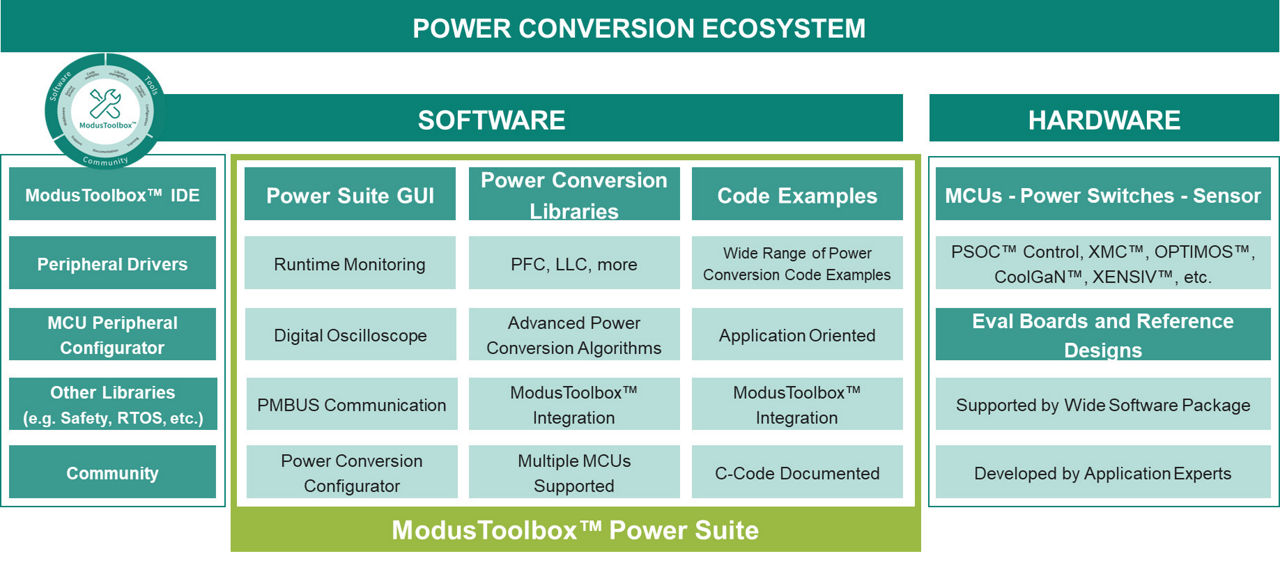
Infineon provides an ecosystem for power conversion designs including hardware (semiconductor components and evaluation boards) and software. ModusToolbox™ Power Suite addresses software needs through the different stages of the design, with power conversion-specific libraries, evaluation tools and code examples among others. ModusToolbox™ Power Suite complements ModusToolbox™ ecosystem with a free-of-charge package specifically designed for power conversion engineers.
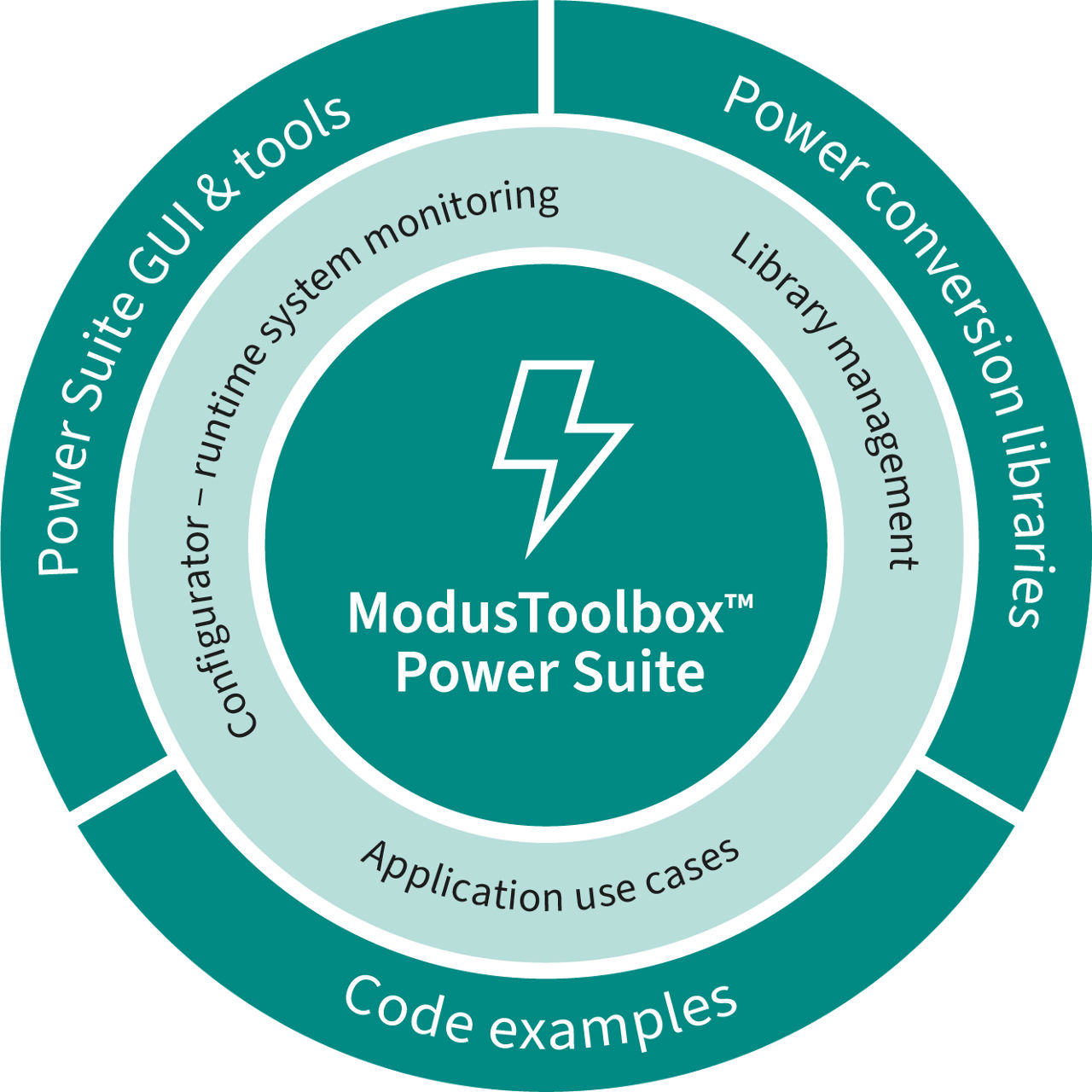
Power Suite is comprised of different assets, including:
- Power Suite GUI: evaluation GUI to help during lab test of evaluation boards and other solutions
- Power Suite Libraries: middleware to run digital power control of power stages
- Code examples: C-code source code running in evaluation boards to provide examples of usage
- Power Conversion Configurator (PCC): User Interface to configure MCU peripherals easily for buck converter -and variations- topology
In order to support embedded designers of power supplies, ModusToolbox™ Power Suite provides two main categories of embedded software for power conversion applications:
- Power Suite Power Libraries: structured by topology -like PFC, LLC- they support different power conversion embeeded domains including:
- Advanced control algorithms for different power topologies, e.g. TP-PFC, LLC, etc.
- Topology variations like multiphase or interleaving.
- Different controller/filter options like 3P3Z, PI, and more
- Protections and house-keeping functions
- Power Suite Code Examples: get started with a running and tested code example. These application-specific open code examples run on Infineon evaluation boards or reference designs. Get one and start hands on!
Learn digital power conversion solutions, designed by Infineon’s application experts with Power Suite. Infineon offers a range of application examples covering different use cases
Power Suite Code Examples can be found in GitHub/Infineon or via ModusToolbox™ Project Creator. Power Libs are accessible in ModusToolbox™ Library Manager or GitHub
Once embeeded application is ready to run, it needs to be tested and debugged in lab. Power Suite GUI is a desktop tool to simplify the evaluation of power conversion solutions in lab and to enhance the debugging experience. With an intuitive and modern UI (User Interface) Power Suite GUI allows you to command your lab test while monitoring in real time the status of the power supply and MCU controlling it.
Based on PMBUS commands, user can modify voltages, set protections or program customer commands. Different graphical elements are available for improving debugging experience and accelerate overall optimize-run-test-optimize loop.
The integrated digital oscilloscope allows to live monitor waveforms captured directly from the application board including voltages, currents and more in an attractive full-featured digital scope tool with features like advanced trigger mechanism, cursors, statistics and much more.
- Faster Time-to-Market: out-of-the-box solutions like comprehensive firmware and MCU configuration tools enable developers to quickly design, test, and optimize power conversion systems, reducing time-to-market. Forget about learning tools or reading datasheets, start with the application
- Improved Performance: advanced modern algorithms optimized for Infineon MCUs, is tailored for optimal power stage performance, efficiency, and reliability.
- Fully integrated into ModusToolbox(TM): simplify development by providing all needed resources in a single tool, including peripheral drivers, middleware, configuration tools and other component support like smart sensors or drivers.
The latest version of ModusToolbox™ Power Suite can be downloaded from the Infineon Developer Center (IDC) or via the ModusToolbox™ Setup tool.
In order to get started, you need to:
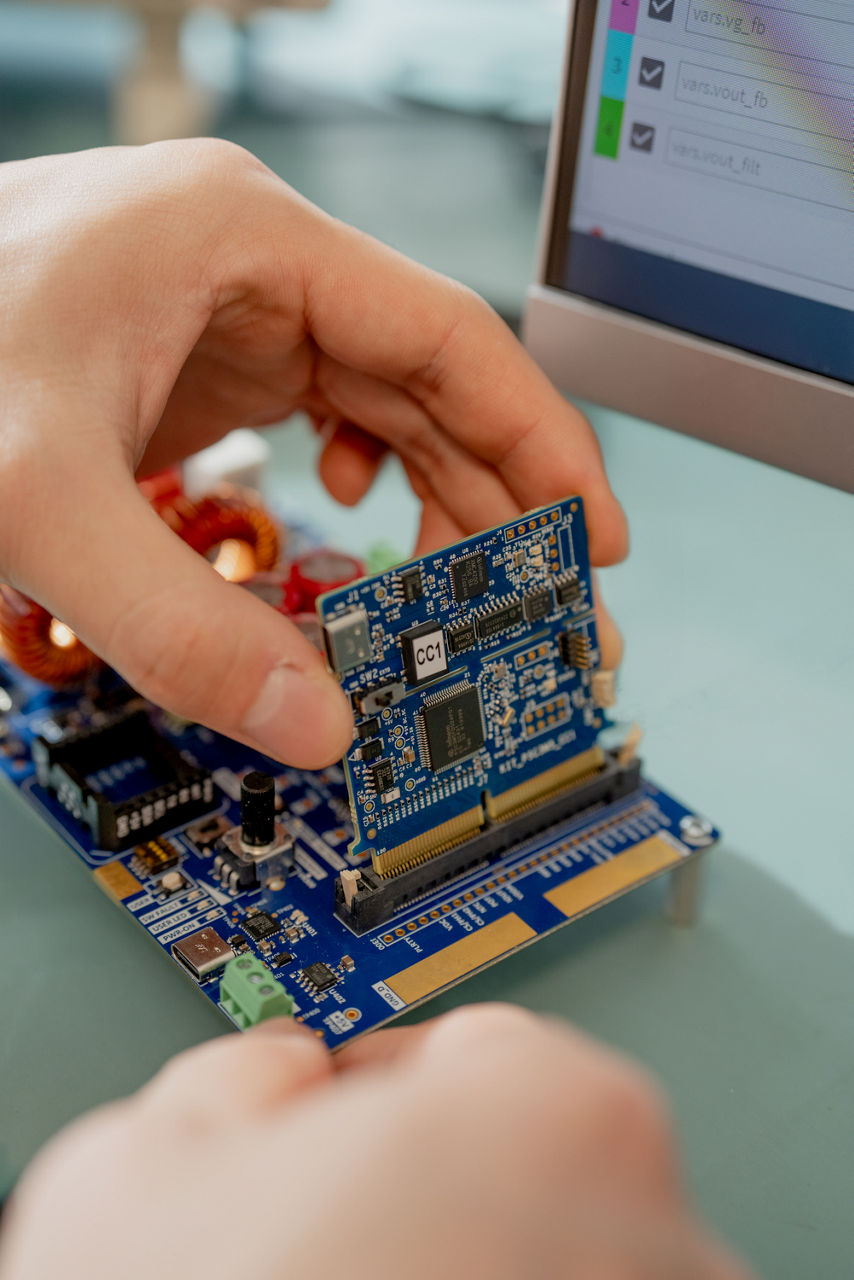
- Get a supported evaluation board or reference design
- Download and install the ModusToolbox™ Power Suite from IDC (Infineon Developer Center). Alternatively, you can use the ModusToolbox™ Setup tool
- Follow the ‘quick-start-guide’ instructions of the purchased evaluation board or kit.
Get your power conversion application started with a wide range of tools and support resources, from libraries to configuration tools.
Infineon provides an ecosystem for power conversion designs including hardware (semiconductor components and evaluation boards) and software. ModusToolbox™ Power Suite addresses software needs through the different stages of the design, with power conversion-specific libraries, evaluation tools and code examples among others. ModusToolbox™ Power Suite complements ModusToolbox™ ecosystem with a free-of-charge package specifically designed for power conversion engineers.
Power Suite is comprised of different assets, including:
- Power Suite GUI: evaluation GUI to help during lab test of evaluation boards and other solutions
- Power Suite Libraries: middleware to run digital power control of power stages
- Code examples: C-code source code running in evaluation boards to provide examples of usage
- Power Conversion Configurator (PCC): User Interface to configure MCU peripherals easily for buck converter -and variations- topology
In order to support embedded designers of power supplies, ModusToolbox™ Power Suite provides two main categories of embedded software for power conversion applications:
- Power Suite Power Libraries: structured by topology -like PFC, LLC- they support different power conversion embeeded domains including:
- Advanced control algorithms for different power topologies, e.g. TP-PFC, LLC, etc.
- Topology variations like multiphase or interleaving.
- Different controller/filter options like 3P3Z, PI, and more
- Protections and house-keeping functions
- Power Suite Code Examples: get started with a running and tested code example. These application-specific open code examples run on Infineon evaluation boards or reference designs. Get one and start hands on!
Learn digital power conversion solutions, designed by Infineon’s application experts with Power Suite. Infineon offers a range of application examples covering different use cases
Power Suite Code Examples can be found in GitHub/Infineon or via ModusToolbox™ Project Creator. Power Libs are accessible in ModusToolbox™ Library Manager or GitHub
Once embeeded application is ready to run, it needs to be tested and debugged in lab. Power Suite GUI is a desktop tool to simplify the evaluation of power conversion solutions in lab and to enhance the debugging experience. With an intuitive and modern UI (User Interface) Power Suite GUI allows you to command your lab test while monitoring in real time the status of the power supply and MCU controlling it.
Based on PMBUS commands, user can modify voltages, set protections or program customer commands. Different graphical elements are available for improving debugging experience and accelerate overall optimize-run-test-optimize loop.
The integrated digital oscilloscope allows to live monitor waveforms captured directly from the application board including voltages, currents and more in an attractive full-featured digital scope tool with features like advanced trigger mechanism, cursors, statistics and much more.
- Faster Time-to-Market: out-of-the-box solutions like comprehensive firmware and MCU configuration tools enable developers to quickly design, test, and optimize power conversion systems, reducing time-to-market. Forget about learning tools or reading datasheets, start with the application
- Improved Performance: advanced modern algorithms optimized for Infineon MCUs, is tailored for optimal power stage performance, efficiency, and reliability.
- Fully integrated into ModusToolbox(TM): simplify development by providing all needed resources in a single tool, including peripheral drivers, middleware, configuration tools and other component support like smart sensors or drivers.
The latest version of ModusToolbox™ Power Suite can be downloaded from the Infineon Developer Center (IDC) or via the ModusToolbox™ Setup tool.
In order to get started, you need to:
- Get a supported evaluation board or reference design
- Download and install the ModusToolbox™ Power Suite from IDC (Infineon Developer Center). Alternatively, you can use the ModusToolbox™ Setup tool
- Follow the ‘quick-start-guide’ instructions of the purchased evaluation board or kit.
Image gallery

Share in WeChat
Scan the QR code with your WeChat App to share this page.